android官方文档

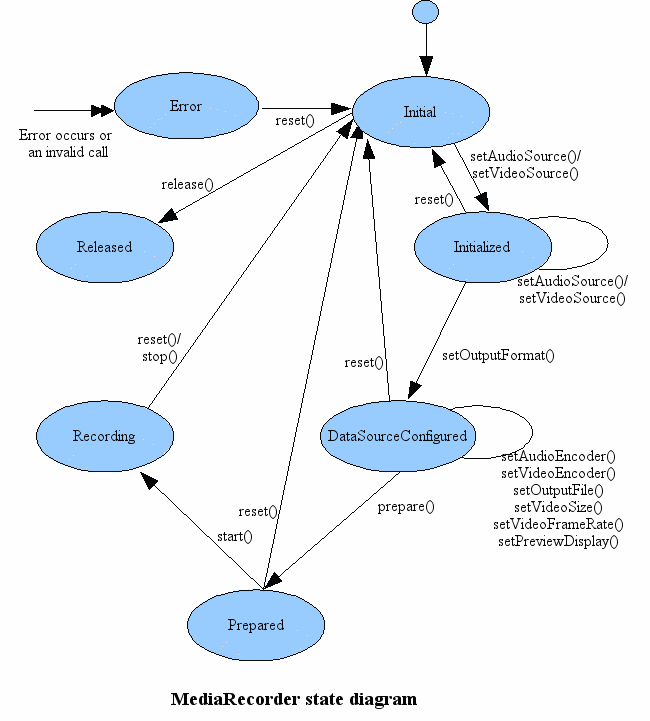
一般使用流程

 1
 2
 3
 4
 5
 6
 7
 8
 9
10
11
  MediaRecorder recorder = new MediaRecorder();
  recorder.setAudioSource(MediaRecorder.AudioSource.MIC);
  recorder.setOutputFormat(MediaRecorder.OutputFormat.THREE_GPP);
  recorder.setAudioEncoder(MediaRecorder.AudioEncoder.AMR_NB);
  recorder.setOutputFile(PATH_NAME);
  recorder.prepare();
  recorder.start();   // 录制已经开始了
  ...
  recorder.stop();
  recorder.reset();   // 重置,这时可以重新设置AudioSource
  recorder.release(); // 释放资源

流程状态图 mediarecorder_state_diagram.gif

常见内部类或接口

AudioSource 可选音频源

  • DEFAULT 默认音频源
  • MIC 麦克风
  • VOICE_CALL 打电话
  • CAMCORDER 相机录像时的音频源
  • VOICE_COMMUNICATION 语音通话,VoIP,带音频去回声,增益

VideoSource 可选视频源

  • DEFAULT 系统预设默认
  • CAMERA 从相机获取视频
  • SURFACE 从surface中获取

OutputFormat 输出格式

  • DEFAULT 系统预设默认
  • THREE_GPP 3GP,视频
  • MEPG_4 mp4,视频
  • RAW_AMR
  • AMR_NB
  • AMR_WB
  • AAC_ADIF
  • AAC_ADTS
  • OUTPUT_FORMAT_RTP_AVP
  • MPEG_2_TS
  • WEBM
  • HEIF
  • OGG

AudioEncoder 可选音频编码常量

  • DEFAULT
  • AMR_NB
  • AMR_WB
  • AAC
  • HE_AAC
  • AAC_ELD
  • VORBIS
  • OPUS

VideoEncoder 可选视频编码常量

  • DEFAULT
  • H263
  • H264
  • MPEG_4_SP
  • VP8
  • HEVC(H265)
  • VP9
  • DOLBY_VISION
  • AV1

OnErrorListener 错误回调接口

 1
 2
 3
 4
 5
 6
 7
 8
 9
10
11
12
13
14
15
16
17
18
19
20
21
22
23
24
25
	/*
     * 未指定的MediaRecorder错误
     */
	public static final int MEDIA_RECORDER_ERROR_UNKNOWN=1;
	
	/**
	 * 媒体服务器死亡。在这种情况下,应用程序必须释放MediaRecorder对象并实例化一个新对象 
	 */
	public static final int MEDIA_ERROR_SERVER_DIED = 100;

	public interface OnErrorListener
    {
        /**
         * 在录制时发生错误的时候调用
         *
         * @param mr 遇到错误的MediaRecorder对象
         * @param what  错误类型
         * <ul>
         * <li>{@link #MEDIA_RECORDER_ERROR_UNKNOWN}
         * <li>{@link #MEDIA_ERROR_SERVER_DIED}
         * </ul>
         * @param extra  特定错误类型的错误代码
         */
        void onError(MediaRecorder mr, int what, int extra);
    }

OnInfoListener 录制信息回调接口

 1
 2
 3
 4
 5
 6
 7
 8
 9
10
11
12
13
14
15
16
17
18
19
20
21
22
23
24
25
26
	
	//未指定的信息类型
	public static final int MEDIA_RECORDER_INFO_UNKNOWN              = 1;
	
	//达到最大录制时间提示
	public static final int MEDIA_RECORDER_INFO_MAX_DURATION_REACHED = 800;
	
	//达到最大录制文件大小提示
	public static final int MEDIA_RECORDER_INFO_MAX_FILESIZE_REACHED = 801;

	public interface OnInfoListener
    {
        /**
         * 录制过程中提示或警告回调该接口
         *
         * @param mr   触发提示或警告的MediaRecorder
         * @param what 发生的提示或警告类型
         * <ul>
         * <li>{@link #MEDIA_RECORDER_INFO_UNKNOWN}
         * <li>{@link #MEDIA_RECORDER_INFO_MAX_DURATION_REACHED}
         * <li>{@link #MEDIA_RECORDER_INFO_MAX_FILESIZE_REACHED}
         * </ul>
         * @param extra   特定提示或警告类型的代码
         */
        void onInfo(MediaRecorder mr, int what, int extra);
    }

常见方法

视频相关

getSurface():Surface

1
2
3
4
5
6
7
8
9
    /**
     * 获取在使用surface视频源时的surface
     *
     * 只能在prepare方法之后调用. 在调用start方法之前surface中渲染的帧数据将被丢弃
     *
     * @throws IllegalStateException 在调用prepare方法之前,stop方法之后,或者未设置surface视频源调用该方法抛出该异常 
     * @see android.media.MediaRecorder.VideoSource
     */
    public native Surface getSurface();

setInputSurface(Surface):void

 1
 2
 3
 4
 5
 6
 7
 8
 9
10
11
12
13
14
15
16
17
18
    /**
     * 当配置使用SURFACE视频源时,这个方法为录制器设置一个持续更新的surface
     * 只能在prepare方法之前调用
     * @param surface a persistent input surface created by
     *           {@link MediaCodec#createPersistentInputSurface}
     * @throws IllegalStateException if it is called after {@link #prepare} and before
     * {@link #stop}.
     * @throws IllegalArgumentException if the surface was not created by
     *           {@link MediaCodec#createPersistentInputSurface}.
     * @see MediaCodec#createPersistentInputSurface
     * @see MediaRecorder.VideoSource
     */
    public void setInputSurface(@NonNull Surface surface) {
        if (!(surface instanceof MediaCodec.PersistentSurface)) {
            throw new IllegalArgumentException("not a PersistentSurface");
        }
        native_setInputSurface(surface);
    }

setPreviewDisplay(Surface):void

 1
 2
 3
 4
 5
 6
 7
 8
 9
10
11
12
13
14
15
16
17
    /**
     * 设置一个surface用来显示当前录制中的视频。需要在prepare方法之前调用
     * Sets a Surface to show a preview of recorded media (video). Calls this
     * before prepare() to make sure that the desirable preview display is
     * set. If {@link #setCamera(Camera)} is used and the surface has been
     * already set to the camera, application do not need to call this. If
     * this is called with non-null surface, the preview surface of the camera
     * will be replaced by the new surface. If this method is called with null
     * surface or not called at all, media recorder will not change the preview
     * surface of the camera.
     *
     * @param sv the Surface to use for the preview
     * @see android.hardware.Camera#setPreviewDisplay(android.view.SurfaceHolder)
     */
    public void setPreviewDisplay(Surface sv) {
        mSurface = sv;
    }

isSystemOnlyAudioSource(int):boolean

 1
 2
 3
 4
 5
 6
 7
 8
 9
10
11
12
13
14
15
16
17
18
19
20
21
22
23
24
    // TODO make AudioSource static (API change) and move this method inside the AudioSource class
    /**
     * @hide
     * @param source An audio source to test
     * @return true if the source is only visible to system components
     */
    public static boolean isSystemOnlyAudioSource(int source) {
        switch(source) {
            case AudioSource.DEFAULT:
            case AudioSource.MIC:
            case AudioSource.VOICE_UPLINK:
            case AudioSource.VOICE_DOWNLINK:
            case AudioSource.VOICE_CALL:
            case AudioSource.CAMCORDER:
            case AudioSource.VOICE_RECOGNITION:
            case AudioSource.VOICE_COMMUNICATION:
            //case REMOTE_SUBMIX:  considered "system" as it requires system permissions
            case AudioSource.UNPROCESSED:
            case AudioSource.VOICE_PERFORMANCE:
                return false;
            default:
                return true;
        }
    }

isValidAudioSource(int):boolean

 1
 2
 3
 4
 5
 6
 7
 8
 9
10
11
12
13
14
15
16
17
18
19
20
21
22
23
24
25
26
    /**
     * @hide
     * @param source An audio source to test
     * @return true if the source is a valid one
     */
    public static boolean isValidAudioSource(int source) {
        switch(source) {
            case AudioSource.MIC:
            case AudioSource.VOICE_UPLINK:
            case AudioSource.VOICE_DOWNLINK:
            case AudioSource.VOICE_CALL:
            case AudioSource.CAMCORDER:
            case AudioSource.VOICE_RECOGNITION:
            case AudioSource.VOICE_COMMUNICATION:
            case AudioSource.REMOTE_SUBMIX:
            case AudioSource.UNPROCESSED:
            case AudioSource.VOICE_PERFORMANCE:
            case AudioSource.ECHO_REFERENCE:
            case AudioSource.RADIO_TUNER:
            case AudioSource.HOTWORD:
            case AudioSource.ULTRASOUND:
                return true;
            default:
                return false;
        }
    }

setVideoSource(int):void

 1
 2
 3
 4
 5
 6
 7
 8
 9
10
11
12
    /**
     * Sets the video source to be used for recording. If this method is not
     * called, the output file will not contain an video track. The source needs
     * to be specified before setting recording-parameters or encoders. Call
     * this only before setOutputFormat().
     *
     * @param video_source the video source to use
     * @throws IllegalStateException if it is called after setOutputFormat()
     * @see android.media.MediaRecorder.VideoSource
     */
    public native void setVideoSource(int video_source)
            throws IllegalStateException;

setProfile(CamcorderProfile):void

 1
 2
 3
 4
 5
 6
 7
 8
 9
10
11
12
13
14
15
16
17
18
19
20
21
22
23
24
25
26
    /**
     * Uses the settings from a CamcorderProfile object for recording. This method should
     * be called after the video AND audio sources are set, and before setOutputFile().
     * If a time lapse CamcorderProfile is used, audio related source or recording
     * parameters are ignored.
     *
     * @param profile the CamcorderProfile to use
     * @see android.media.CamcorderProfile
     */
    public void setProfile(CamcorderProfile profile) {
        setOutputFormat(profile.fileFormat);
        setVideoFrameRate(profile.videoFrameRate);
        setVideoSize(profile.videoFrameWidth, profile.videoFrameHeight);
        setVideoEncodingBitRate(profile.videoBitRate);
        setVideoEncoder(profile.videoCodec);
        if (profile.quality >= CamcorderProfile.QUALITY_TIME_LAPSE_LOW &&
             profile.quality <= CamcorderProfile.QUALITY_TIME_LAPSE_QVGA) {
            // Nothing needs to be done. Call to setCaptureRate() enables
            // time lapse video recording.
        } else {
            setAudioEncodingBitRate(profile.audioBitRate);
            setAudioChannels(profile.audioChannels);
            setAudioSamplingRate(profile.audioSampleRate);
            setAudioEncoder(profile.audioCodec);
        }
    }

setVideoProfile(VideoProfile):void

 1
 2
 3
 4
 5
 6
 7
 8
 9
10
11
12
13
14
15
16
17
18
19
20
21
    /**
     * Uses the settings from a VideoProfile object for recording.
     * <p>
     * This method should be called after the video AND audio sources are set, and before
     * setOutputFile().
     * <p>
     * This method can be used instead of {@link #setProfile} when using EncoderProfiles.
     *
     * @param profile the VideoProfile to use
     * @see android.media.EncoderProfiles
     * @see android.media.CamcorderProfile#getAll
     */
    public void setVideoProfile(@NonNull EncoderProfiles.VideoProfile profile) {
        setVideoFrameRate(profile.getFrameRate());
        setVideoSize(profile.getWidth(), profile.getHeight());
        setVideoEncodingBitRate(profile.getBitrate());
        setVideoEncoder(profile.getCodec());
        if (profile.getProfile() >= 0) {
            setVideoEncodingProfileLevel(profile.getProfile(), 0 /* level */);
        }
    }

setCaptureRate(double):void

 1
 2
 3
 4
 5
 6
 7
 8
 9
10
11
12
13
14
15
16
17
18
19
20
21
    /**
     * Set video frame capture rate. This can be used to set a different video frame capture
     * rate than the recorded video's playback rate. This method also sets the recording mode
     * to time lapse. In time lapse video recording, only video is recorded. Audio related
     * parameters are ignored when a time lapse recording session starts, if an application
     * sets them.
     *
     * @param fps Rate at which frames should be captured in frames per second.
     * The fps can go as low as desired. However the fastest fps will be limited by the hardware.
     * For resolutions that can be captured by the video camera, the fastest fps can be computed using
     * {@link android.hardware.Camera.Parameters#getPreviewFpsRange(int[])}. For higher
     * resolutions the fastest fps may be more restrictive.
     * Note that the recorder cannot guarantee that frames will be captured at the
     * given rate due to camera/encoder limitations. However it tries to be as close as
     * possible.
     */
    public void setCaptureRate(double fps) {
        // Make sure that time lapse is enabled when this method is called.
        setParameter("time-lapse-enable=1");
        setParameter("time-lapse-fps=" + fps);
    }

setOrientationHint(int):void

 1
 2
 3
 4
 5
 6
 7
 8
 9
10
11
12
13
14
15
16
17
18
19
20
21
22
23
24
    /**
     * Sets the orientation hint for output video playback.
     * This method should be called before prepare(). This method will not
     * trigger the source video frame to rotate during video recording, but to
     * add a composition matrix containing the rotation angle in the output
     * video if the output format is OutputFormat.THREE_GPP or
     * OutputFormat.MPEG_4 so that a video player can choose the proper
     * orientation for playback. Note that some video players may choose
     * to ignore the compostion matrix in a video during playback.
     *
     * @param degrees the angle to be rotated clockwise in degrees.
     * The supported angles are 0, 90, 180, and 270 degrees.
     * @throws IllegalArgumentException if the angle is not supported.
     *
     */
    public void setOrientationHint(int degrees) {
        if (degrees != 0   &&
            degrees != 90  &&
            degrees != 180 &&
            degrees != 270) {
            throw new IllegalArgumentException("Unsupported angle: " + degrees);
        }
        setParameter("video-param-rotation-angle-degrees=" + degrees);
    }

setVideoSize(int,int):void

 1
 2
 3
 4
 5
 6
 7
 8
 9
10
11
12
    /**
     * Sets the width and height of the video to be captured.  Must be called
     * after setVideoSource(). Call this after setOutputFormat() but before
     * prepare().
     *
     * @param width the width of the video to be captured
     * @param height the height of the video to be captured
     * @throws IllegalStateException if it is called after
     * prepare() or before setOutputFormat()
     */
    public native void setVideoSize(int width, int height)
            throws IllegalStateException;

setVideoFrameRate(int):void

 1
 2
 3
 4
 5
 6
 7
 8
 9
10
11
12
13
14
    /**
     * Sets the frame rate of the video to be captured.  Must be called
     * after setVideoSource(). Call this after setOutputFormat() but before
     * prepare().
     *
     * @param rate the number of frames per second of video to capture
     * @throws IllegalStateException if it is called after
     * prepare() or before setOutputFormat().
     *
     * NOTE: On some devices that have auto-frame rate, this sets the
     * maximum frame rate, not a constant frame rate. Actual frame rate
     * will vary according to lighting conditions.
     */
    public native void setVideoFrameRate(int rate) throws IllegalStateException;

setVideoEncoder(int):void

 1
 2
 3
 4
 5
 6
 7
 8
 9
10
11
12
    /**
     * Sets the video encoder to be used for recording. If this method is not
     * called, the output file will not contain an video track. Call this after
     * setOutputFormat() and before prepare().
     *
     * @param video_encoder the video encoder to use.
     * @throws IllegalStateException if it is called before
     * setOutputFormat() or after prepare()
     * @see android.media.MediaRecorder.VideoEncoder
     */
    public native void setVideoEncoder(@VideoEncoderValues int video_encoder)
            throws IllegalStateException;

setVideoEncodingBitRate(int):void

 1
 2
 3
 4
 5
 6
 7
 8
 9
10
11
12
13
14
15
16
17
18
19
20
21
22
    /**
     * Sets the video encoding bit rate for recording. Call this method before prepare().
     * Prepare() may perform additional checks on the parameter to make sure whether the
     * specified bit rate is applicable, and sometimes the passed bitRate will be
     * clipped internally to ensure the video recording can proceed smoothly based on
     * the capabilities of the platform.
     *
     * <p>
     * NB: the actual bitrate and other encoding characteristics may be affected by
     * the minimum quality floor behavior introduced in
     * {@link android.os.Build.VERSION_CODES#S}. More detail on how and where this
     * impacts video encoding can be found in the
     * {@link MediaCodec} page and looking for "quality floor" (near the top of the page).
     *
     * @param bitRate the video encoding bit rate in bits per second.
     */
    public void setVideoEncodingBitRate(int bitRate) {
        if (bitRate <= 0) {
            throw new IllegalArgumentException("Video encoding bit rate is not positive");
        }
        setParameter("video-param-encoding-bitrate=" + bitRate);
    }

setVideoEncodingProfileLevel(int,int):void

 1
 2
 3
 4
 5
 6
 7
 8
 9
10
11
12
13
14
15
16
17
18
19
20
21
22
23
24
25
    /**
     * Sets the desired video encoding profile and level for recording. The profile and level
     * must be valid for the video encoder set by {@link #setVideoEncoder}. This method can
     * called before or after {@link #setVideoEncoder} but it must be called before {@link #prepare}.
     * {@code prepare()} may perform additional checks on the parameter to make sure that the specified
     * profile and level are applicable, and sometimes the passed profile or level will be
     * discarded due to codec capablity or to ensure the video recording can proceed smoothly
     * based on the capabilities of the platform. <br>Application can also use the
     * {@link MediaCodecInfo.CodecCapabilities#profileLevels} to query applicable combination of profile
     * and level for the corresponding format. Note that the requested profile/level may not be supported by
     * the codec that is actually being used by this MediaRecorder instance.
     * @param profile declared in {@link MediaCodecInfo.CodecProfileLevel}.
     * @param level declared in {@link MediaCodecInfo.CodecProfileLevel}.
     * @throws IllegalArgumentException when an invalid profile or level value is used.
     */
    public void setVideoEncodingProfileLevel(int profile, int level) {
        if (profile < 0)  {
            throw new IllegalArgumentException("Video encoding profile is not positive");
        }
        if (level < 0)  {
            throw new IllegalArgumentException("Video encoding level is not positive");
        }
        setParameter("video-param-encoder-profile=" + profile);
        setParameter("video-param-encoder-level=" + level);
    }

音频相关

setAudioSource(int):void

 1
 2
 3
 4
 5
 6
 7
 8
 9
10
11
12
    /**
     * Sets the audio source to be used for recording. If this method is not
     * called, the output file will not contain an audio track. The source needs
     * to be specified before setting recording-parameters or encoders. Call
     * this only before setOutputFormat().
     *
     * @param audioSource the audio source to use
     * @throws IllegalStateException if it is called after setOutputFormat()
     * @see android.media.MediaRecorder.AudioSource
     */
    public native void setAudioSource(@Source int audioSource)
            throws IllegalStateException;

getAudioSourceMax():int

1
2
3
4
5
6
7
    /**
     * Gets the maximum value for audio sources.
     * @see android.media.MediaRecorder.AudioSource
     */
    public static final int getAudioSourceMax() {
        return AudioSource.VOICE_PERFORMANCE;
    }

setAudioProfile(AudioProfile):void

 1
 2
 3
 4
 5
 6
 7
 8
 9
10
11
12
13
14
15
16
17
18
    /**
     * Uses the settings from an AudioProfile for recording.
     * <p>
     * This method should be called after the video AND audio sources are set, and before
     * setOutputFile().
     * <p>
     * This method can be used instead of {@link #setProfile} when using EncoderProfiles.
     *
     * @param profile the AudioProfile to use
     * @see android.media.EncoderProfiles
     * @see android.media.CamcorderProfile#getAll
     */
    public void setAudioProfile(@NonNull EncoderProfiles.AudioProfile profile) {
        setAudioEncodingBitRate(profile.getBitrate());
        setAudioChannels(profile.getChannels());
        setAudioSamplingRate(profile.getSampleRate());
        setAudioEncoder(profile.getCodec());
    }

setAudioEncoder(int):void

 1
 2
 3
 4
 5
 6
 7
 8
 9
10
11
12
    /**
     * Sets the audio encoder to be used for recording. If this method is not
     * called, the output file will not contain an audio track. Call this after
     * setOutputFormat() but before prepare().
     *
     * @param audio_encoder the audio encoder to use.
     * @throws IllegalStateException if it is called before
     * setOutputFormat() or after prepare().
     * @see android.media.MediaRecorder.AudioEncoder
     */
    public native void setAudioEncoder(@AudioEncoderValues int audio_encoder)
            throws IllegalStateException;

setAudioSamplingRate(int):void

 1
 2
 3
 4
 5
 6
 7
 8
 9
10
11
12
13
14
15
16
17
18
    /**
     * Sets the audio sampling rate for recording. Call this method before prepare().
     * Prepare() may perform additional checks on the parameter to make sure whether
     * the specified audio sampling rate is applicable. The sampling rate really depends
     * on the format for the audio recording, as well as the capabilities of the platform.
     * For instance, the sampling rate supported by AAC audio coding standard ranges
     * from 8 to 96 kHz, the sampling rate supported by AMRNB is 8kHz, and the sampling
     * rate supported by AMRWB is 16kHz. Please consult with the related audio coding
     * standard for the supported audio sampling rate.
     *
     * @param samplingRate the sampling rate for audio in samples per second.
     */
    public void setAudioSamplingRate(int samplingRate) {
        if (samplingRate <= 0) {
            throw new IllegalArgumentException("Audio sampling rate is not positive");
        }
        setParameter("audio-param-sampling-rate=" + samplingRate);
    }

setAudioChannels(int):void

 1
 2
 3
 4
 5
 6
 7
 8
 9
10
11
12
13
14
15
    /**
     * Sets the number of audio channels for recording. Call this method before prepare().
     * Prepare() may perform additional checks on the parameter to make sure whether the
     * specified number of audio channels are applicable.
     *
     * @param numChannels the number of audio channels. Usually it is either 1 (mono) or 2
     * (stereo).
     */
    public void setAudioChannels(int numChannels) {
        if (numChannels <= 0) {
            throw new IllegalArgumentException("Number of channels is not positive");
        }
        mChannelCount = numChannels;
        setParameter("audio-param-number-of-channels=" + numChannels);
    }

setAudioEncodingBitRate(int):void

 1
 2
 3
 4
 5
 6
 7
 8
 9
10
11
12
13
14
15
    /**
     * Sets the audio encoding bit rate for recording. Call this method before prepare().
     * Prepare() may perform additional checks on the parameter to make sure whether the
     * specified bit rate is applicable, and sometimes the passed bitRate will be clipped
     * internally to ensure the audio recording can proceed smoothly based on the
     * capabilities of the platform.
     *
     * @param bitRate the audio encoding bit rate in bits per second.
     */
    public void setAudioEncodingBitRate(int bitRate) {
        if (bitRate <= 0) {
            throw new IllegalArgumentException("Audio encoding bit rate is not positive");
        }
        setParameter("audio-param-encoding-bitrate=" + bitRate);
    }

setPreferredDevice(AudioDeviceInfo):boolean [AudioRouting]

 1
 2
 3
 4
 5
 6
 7
 8
 9
10
11
12
13
14
15
16
17
18
19
20
21
22
    /**
     * Specifies an audio device (via an {@link AudioDeviceInfo} object) to route
     * the input from this MediaRecorder.
     * @param deviceInfo The {@link AudioDeviceInfo} specifying the audio source.
     *  If deviceInfo is null, default routing is restored.
     * @return true if succesful, false if the specified {@link AudioDeviceInfo} is non-null and
     * does not correspond to a valid audio input device.
     */
    @Override
    public boolean setPreferredDevice(AudioDeviceInfo deviceInfo) {
        if (deviceInfo != null && !deviceInfo.isSource()) {
            return false;
        }
        int preferredDeviceId = deviceInfo != null ? deviceInfo.getId() : 0;
        boolean status = native_setInputDevice(preferredDeviceId);
        if (status == true) {
            synchronized (this) {
                mPreferredDevice = deviceInfo;
            }
        }
        return status;
    }

getPreferredDevice():AudioDeviceInfo [AudioRouting]

 1
 2
 3
 4
 5
 6
 7
 8
 9
10
    /**
     * Returns the selected input device specified by {@link #setPreferredDevice}. Note that this
     * is not guaranteed to correspond to the actual device being used for recording.
     */
    @Override
    public AudioDeviceInfo getPreferredDevice() {
        synchronized (this) {
            return mPreferredDevice;
        }
    }

getRoutedDevice():AudioDeviceInfo [AudioRouting]

 1
 2
 3
 4
 5
 6
 7
 8
 9
10
11
12
13
14
    /**
     * Returns an {@link AudioDeviceInfo} identifying the current routing of this MediaRecorder
     * Note: The query is only valid if the MediaRecorder is currently recording.
     * If the recorder is not recording, the returned device can be null or correspond to previously
     * selected device when the recorder was last active.
     */
    @Override
    public AudioDeviceInfo getRoutedDevice() {
        int deviceId = native_getRoutedDeviceId();
        if (deviceId == 0) {
            return null;
        }
        return AudioManager.getDeviceForPortId(deviceId, AudioManager.GET_DEVICES_INPUTS);
    }

add/removeOnRoutingChangedListener(OnRoutingChangedListener):void [AudioRouting]

 1
 2
 3
 4
 5
 6
 7
 8
 9
10
11
12
13
14
15
16
17
18
19
20
21
22
23
24
25
26
27
28
29
30
31
32
33
34
35
36
    /**
     * Adds an {@link AudioRouting.OnRoutingChangedListener} to receive notifications of routing
     * changes on this MediaRecorder.
     * @param listener The {@link AudioRouting.OnRoutingChangedListener} interface to receive
     * notifications of rerouting events.
     * @param handler  Specifies the {@link Handler} object for the thread on which to execute
     * the callback. If <code>null</code>, the handler on the main looper will be used.
     */
    @Override
    public void addOnRoutingChangedListener(AudioRouting.OnRoutingChangedListener listener,
                                            Handler handler) {
        synchronized (mRoutingChangeListeners) {
            if (listener != null && !mRoutingChangeListeners.containsKey(listener)) {
                enableNativeRoutingCallbacksLocked(true);
                mRoutingChangeListeners.put(
                        listener, new NativeRoutingEventHandlerDelegate(this, listener,
                                handler != null ? handler : mEventHandler));
            }
        }
    }

    /**
     * Removes an {@link AudioRouting.OnRoutingChangedListener} which has been previously added
     * to receive rerouting notifications.
     * @param listener The previously added {@link AudioRouting.OnRoutingChangedListener} interface
     * to remove.
     */
    @Override
    public void removeOnRoutingChangedListener(AudioRouting.OnRoutingChangedListener listener) {
        synchronized (mRoutingChangeListeners) {
            if (mRoutingChangeListeners.containsKey(listener)) {
                mRoutingChangeListeners.remove(listener);
                enableNativeRoutingCallbacksLocked(false);
            }
        }
    }

getActiveMicrophones():List

 1
 2
 3
 4
 5
 6
 7
 8
 9
10
11
12
13
14
15
16
17
18
19
20
21
22
23
24
25
26
27
28
29
30
31
32
33
34
35
36
37
    //--------------------------------------------------------------------------
    // Microphone information
    //--------------------
    /**
     * Return A lists of {@link MicrophoneInfo} representing the active microphones.
     * By querying channel mapping for each active microphone, developer can know how
     * the microphone is used by each channels or a capture stream.
     *
     * @return a lists of {@link MicrophoneInfo} representing the active microphones
     * @throws IOException if an error occurs
     */
    public List<MicrophoneInfo> getActiveMicrophones() throws IOException {
        ArrayList<MicrophoneInfo> activeMicrophones = new ArrayList<>();
        int status = native_getActiveMicrophones(activeMicrophones);
        if (status != AudioManager.SUCCESS) {
            if (status != AudioManager.ERROR_INVALID_OPERATION) {
                Log.e(TAG, "getActiveMicrophones failed:" + status);
            }
            Log.i(TAG, "getActiveMicrophones failed, fallback on routed device info");
        }
        AudioManager.setPortIdForMicrophones(activeMicrophones);

        // Use routed device when there is not information returned by hal.
        if (activeMicrophones.size() == 0) {
            AudioDeviceInfo device = getRoutedDevice();
            if (device != null) {
                MicrophoneInfo microphone = AudioManager.microphoneInfoFromAudioDeviceInfo(device);
                ArrayList<Pair<Integer, Integer>> channelMapping = new ArrayList<>();
                for (int i = 0; i < mChannelCount; i++) {
                    channelMapping.add(new Pair(i, MicrophoneInfo.CHANNEL_MAPPING_DIRECT));
                }
                microphone.setChannelMapping(channelMapping);
                activeMicrophones.add(microphone);
            }
        }
        return activeMicrophones;
    }

setPreferredMicrophoneDirection(int):boolean [MicrophoneDirection]

 1
 2
 3
 4
 5
 6
 7
 8
 9
10
11
12
    //--------------------------------------------------------------------------
    // MicrophoneDirection
    //--------------------
    /**
     * Specifies the logical microphone (for processing).
     *
     * @param direction Direction constant.
     * @return true if sucessful.
     */
    public boolean setPreferredMicrophoneDirection(@DirectionMode int direction) {
        return native_setPreferredMicrophoneDirection(direction) == 0;
    }

setPreferredMicrophoneFieldDimension(float):boolean [MicrophoneDirection]

 1
 2
 3
 4
 5
 6
 7
 8
 9
10
11
12
13
14
    /**
     * Specifies the zoom factor (i.e. the field dimension) for the selected microphone
     * (for processing). The selected microphone is determined by the use-case for the stream.
     *
     * @param zoom the desired field dimension of microphone capture. Range is from -1 (wide angle),
     * though 0 (no zoom) to 1 (maximum zoom).
     * @return true if sucessful.
     */
    public boolean setPreferredMicrophoneFieldDimension(
                            @FloatRange(from = -1.0, to = 1.0) float zoom) {
        Preconditions.checkArgument(
                zoom >= -1 && zoom <= 1, "Argument must fall between -1 & 1 (inclusive)");
        return native_setPreferredMicrophoneFieldDimension(zoom) == 0;
    }

register/unregisterAudioRecordingCallback([Executor],AudioRecordingCallback):void [AudioRecordingMonitor]

 1
 2
 3
 4
 5
 6
 7
 8
 9
10
11
12
13
14
15
16
17
18
19
20
21
    /**
     * Register a callback to be notified of audio capture changes via a
     * {@link AudioManager.AudioRecordingCallback}. A callback is received when the capture path
     * configuration changes (pre-processing, format, sampling rate...) or capture is
     * silenced/unsilenced by the system.
     * @param executor {@link Executor} to handle the callbacks.
     * @param cb non-null callback to register
     */
    public void registerAudioRecordingCallback(@NonNull @CallbackExecutor Executor executor,
            @NonNull AudioManager.AudioRecordingCallback cb) {
        mRecordingInfoImpl.registerAudioRecordingCallback(executor, cb);
    }

    /**
     * Unregister an audio recording callback previously registered with
     * {@link #registerAudioRecordingCallback(Executor, AudioManager.AudioRecordingCallback)}.
     * @param cb non-null callback to unregister
     */
    public void unregisterAudioRecordingCallback(@NonNull AudioManager.AudioRecordingCallback cb) {
        mRecordingInfoImpl.unregisterAudioRecordingCallback(cb);
    }

getActiveRecordingConfiguration():AudioRecordingConfiguration [AudioRecordingMonitor]

1
2
3
4
5
6
7
8
9
    /**
     * Returns the current active audio recording for this audio recorder.
     * @return a valid {@link AudioRecordingConfiguration} if this recorder is active
     * or null otherwise.
     * @see AudioRecordingConfiguration
     */
    public @Nullable AudioRecordingConfiguration getActiveRecordingConfiguration() {
        return mRecordingInfoImpl.getActiveRecordingConfiguration();
    }

其他

setPrivacySensitive(boolean):void

 1
 2
 3
 4
 5
 6
 7
 8
 9
10
11
12
13
14
15
16
17
18
19
20
21
22
23
24
25
26
27
28
29
    /**
     * Indicates that this capture request is privacy sensitive and that
     * any concurrent capture is not permitted.
     * <p>
     * The default is not privacy sensitive except when the audio source set with
     * {@link #setAudioSource(int)} is {@link AudioSource#VOICE_COMMUNICATION} or
     * {@link AudioSource#CAMCORDER}.
     * <p>
     * Always takes precedence over default from audio source when set explicitly.
     * <p>
     * Using this API is only permitted when the audio source is one of:
     * <ul>
     * <li>{@link AudioSource#MIC}</li>
     * <li>{@link AudioSource#CAMCORDER}</li>
     * <li>{@link AudioSource#VOICE_RECOGNITION}</li>
     * <li>{@link AudioSource#VOICE_COMMUNICATION}</li>
     * <li>{@link AudioSource#UNPROCESSED}</li>
     * <li>{@link AudioSource#VOICE_PERFORMANCE}</li>
     * </ul>
     * Invoking {@link #prepare()} will throw an IOException if this
     * condition is not met.
     * <p>
     * Must be called after {@link #setAudioSource(int)} and before {@link #setOutputFormat(int)}.
     * @param privacySensitive True if capture from this MediaRecorder must be marked as privacy
     * sensitive, false otherwise.
     * @throws IllegalStateException if called before {@link #setAudioSource(int)}
     * or after {@link #setOutputFormat(int)}
     */
    public native void setPrivacySensitive(boolean privacySensitive);

isPrivacySensitive():boolean

1
2
3
4
5
6
7
8
9
    /**
     * Returns whether this MediaRecorder is marked as privacy sensitive or not with
     * regard to audio capture.
     * <p>
     * See {@link #setPrivacySensitive(boolean)}
     * <p>
     * @return true if privacy sensitive, false otherwise
     */
    public native boolean isPrivacySensitive();

setLocation(float,float):void

 1
 2
 3
 4
 5
 6
 7
 8
 9
10
11
12
13
14
15
16
17
18
19
20
21
22
23
24
25
26
27
28
29
30
31
32
    /**
     * Set and store the geodata (latitude and longitude) in the output file.
     * This method should be called before prepare(). The geodata is
     * stored in udta box if the output format is OutputFormat.THREE_GPP
     * or OutputFormat.MPEG_4, and is ignored for other output formats.
     * The geodata is stored according to ISO-6709 standard.
     *
     * @param latitude latitude in degrees. Its value must be in the
     * range [-90, 90].
     * @param longitude longitude in degrees. Its value must be in the
     * range [-180, 180].
     *
     * @throws IllegalArgumentException if the given latitude or
     * longitude is out of range.
     *
     */
    public void setLocation(float latitude, float longitude) {
        int latitudex10000  = (int) (latitude * 10000 + 0.5);
        int longitudex10000 = (int) (longitude * 10000 + 0.5);

        if (latitudex10000 > 900000 || latitudex10000 < -900000) {
            String msg = "Latitude: " + latitude + " out of range.";
            throw new IllegalArgumentException(msg);
        }
        if (longitudex10000 > 1800000 || longitudex10000 < -1800000) {
            String msg = "Longitude: " + longitude + " out of range";
            throw new IllegalArgumentException(msg);
        }

        setParameter("param-geotag-latitude=" + latitudex10000);
        setParameter("param-geotag-longitude=" + longitudex10000);
    }

setOutputFormat(int):void

 1
 2
 3
 4
 5
 6
 7
 8
 9
10
11
12
13
14
15
16
    /**
     * Sets the format of the output file produced during recording. Call this
     * after setAudioSource()/setVideoSource() but before prepare().
     *
     * <p>It is recommended to always use 3GP format when using the H.263
     * video encoder and AMR audio encoder. Using an MPEG-4 container format
     * may confuse some desktop players.</p>
     *
     * @param output_format the output format to use. The output format
     * needs to be specified before setting recording-parameters or encoders.
     * @throws IllegalStateException if it is called after prepare() or before
     * setAudioSource()/setVideoSource().
     * @see android.media.MediaRecorder.OutputFormat
     */
    public native void setOutputFormat(@OutputFormatValues int output_format)
            throws IllegalStateException;

setMaxDuration(int):void

 1
 2
 3
 4
 5
 6
 7
 8
 9
10
11
12
13
14
15
16
17
18
19
20
    /**
     * Sets the maximum duration (in ms) of the recording session.
     * Call this after setOutputFormat() but before prepare().
     * After recording reaches the specified duration, a notification
     * will be sent to the {@link android.media.MediaRecorder.OnInfoListener}
     * with a "what" code of {@link #MEDIA_RECORDER_INFO_MAX_DURATION_REACHED}
     * and recording will be stopped. Stopping happens asynchronously, there
     * is no guarantee that the recorder will have stopped by the time the
     * listener is notified.
     *
     * <p>When using MPEG-4 container ({@link #setOutputFormat(int)} with
     * {@link OutputFormat#MPEG_4}), it is recommended to set maximum duration that fits the use
     * case. Setting a larger than required duration may result in a larger than needed output file
     * because of space reserved for MOOV box expecting large movie data in this recording session.
     *  Unused space of MOOV box is turned into FREE box in the output file.</p>
     *
     * @param max_duration_ms the maximum duration in ms (if zero or negative, disables the duration limit)
     *
     */
    public native void setMaxDuration(int max_duration_ms) throws IllegalArgumentException;

setMaxFileSize(long):void

 1
 2
 3
 4
 5
 6
 7
 8
 9
10
11
12
13
14
15
16
17
18
19
20
    /**
     * Sets the maximum filesize (in bytes) of the recording session.
     * Call this after setOutputFormat() but before prepare().
     * After recording reaches the specified filesize, a notification
     * will be sent to the {@link android.media.MediaRecorder.OnInfoListener}
     * with a "what" code of {@link #MEDIA_RECORDER_INFO_MAX_FILESIZE_REACHED}
     * and recording will be stopped. Stopping happens asynchronously, there
     * is no guarantee that the recorder will have stopped by the time the
     * listener is notified.
     *
     * <p>When using MPEG-4 container ({@link #setOutputFormat(int)} with
     * {@link OutputFormat#MPEG_4}), it is recommended to set maximum filesize that fits the use
     * case. Setting a larger than required filesize may result in a larger than needed output file
     * because of space reserved for MOOV box expecting large movie data in this recording session.
     * Unused space of MOOV box is turned into FREE box in the output file.</p>
     *
     * @param max_filesize_bytes the maximum filesize in bytes (if zero or negative, disables the limit)
     *
     */
    public native void setMaxFileSize(long max_filesize_bytes) throws IllegalArgumentException;

setOutputFile(FileDescriptor/FIle):void

 1
 2
 3
 4
 5
 6
 7
 8
 9
10
11
12
13
14
15
16
17
18
19
20
21
22
23
24
25
26
27
28
29
    /**
     * Pass in the file descriptor of the file to be written. Call this after
     * setOutputFormat() but before prepare().
     *
     * @param fd an open file descriptor to be written into.
     * @throws IllegalStateException if it is called before
     * setOutputFormat() or after prepare()
     */
    public void setOutputFile(FileDescriptor fd) throws IllegalStateException
    {
        mPath = null;
        mFile = null;
        mFd = fd;
    }

    /**
     * Pass in the file object to be written. Call this after setOutputFormat() but before prepare().
     * File should be seekable. After setting the next output file, application should not use the
     * file until {@link #stop}. Application is responsible for cleaning up unused files after
     * {@link #stop} is called.
     *
     * @param file the file object to be written into.
     */
    public void setOutputFile(File file)
    {
        mPath = null;
        mFd = null;
        mFile = file;
    }

setNextOutputFile(File):void

 1
 2
 3
 4
 5
 6
 7
 8
 9
10
11
12
13
14
15
16
17
18
19
20
21
22
23
    /**
     * Sets the next output file descriptor to be used when the maximum filesize is reached
     * on the prior output {@link #setOutputFile} or {@link #setNextOutputFile}). File descriptor
     * must be seekable and writable. After setting the next output file, application should not
     * use the file referenced by this file descriptor until {@link #stop}. It is the application's
     * responsibility to close the file descriptor. It is safe to do so as soon as this call returns.
     * Application must call this after receiving on the
     * {@link android.media.MediaRecorder.OnInfoListener} a "what" code of
     * {@link #MEDIA_RECORDER_INFO_MAX_FILESIZE_APPROACHING} and before receiving a "what" code of
     * {@link #MEDIA_RECORDER_INFO_MAX_FILESIZE_REACHED}. The file is not used until switching to
     * that output. Application will receive{@link #MEDIA_RECORDER_INFO_NEXT_OUTPUT_FILE_STARTED}
     * when the next output file is used. Application will not be able to set a new output file if
     * the previous one has not been used. Application is responsible for cleaning up unused files
     * after {@link #stop} is called.
     *
     * @param fd an open file descriptor to be written into.
     * @throws IllegalStateException if it is called before prepare().
     * @throws IOException if setNextOutputFile fails otherwise.
     */
    public void setNextOutputFile(FileDescriptor fd) throws IOException
    {
        _setNextOutputFile(fd);
    }

prepare():void

 1
 2
 3
 4
 5
 6
 7
 8
 9
10
11
12
13
14
15
16
17
18
19
20
21
22
23
24
25
26
27
28
29
30
31
32
33
    /**
     * Prepares the recorder to begin capturing and encoding data. This method
     * must be called after setting up the desired audio and video sources,
     * encoders, file format, etc., but before start().
     *
     * @throws IllegalStateException if it is called after
     * start() or before setOutputFormat().
     * @throws IOException if prepare fails otherwise.
     */
    public void prepare() throws IllegalStateException, IOException
    {
        if (mPath != null) {
            RandomAccessFile file = new RandomAccessFile(mPath, "rw");
            try {
                _setOutputFile(file.getFD());
            } finally {
                file.close();
            }
        } else if (mFd != null) {
            _setOutputFile(mFd);
        } else if (mFile != null) {
            RandomAccessFile file = new RandomAccessFile(mFile, "rw");
            try {
                _setOutputFile(file.getFD());
            } finally {
                file.close();
            }
        } else {
            throw new IOException("No valid output file");
        }

        _prepare();
    }

start():void

 1
 2
 3
 4
 5
 6
 7
 8
 9
10
11
12
13
14
    /**
     * Begins capturing and encoding data to the file specified with
     * setOutputFile(). Call this after prepare().
     *
     * <p>Since API level 13, if applications set a camera via
     * {@link #setCamera(Camera)}, the apps can use the camera after this method
     * call. The apps do not need to lock the camera again. However, if this
     * method fails, the apps should still lock the camera back. The apps should
     * not start another recording session during recording.
     *
     * @throws IllegalStateException if it is called before
     * prepare() or when the camera is already in use by another app.
     */
    public native void start() throws IllegalStateException;

stop():void

 1
 2
 3
 4
 5
 6
 7
 8
 9
10
11
12
13
    /**
     * Stops recording. Call this after start(). Once recording is stopped,
     * you will have to configure it again as if it has just been constructed.
     * Note that a RuntimeException is intentionally thrown to the
     * application, if no valid audio/video data has been received when stop()
     * is called. This happens if stop() is called immediately after
     * start(). The failure lets the application take action accordingly to
     * clean up the output file (delete the output file, for instance), since
     * the output file is not properly constructed when this happens.
     *
     * @throws IllegalStateException if it is called before start()
     */
    public native void stop() throws IllegalStateException;

pause():void

 1
 2
 3
 4
 5
 6
 7
 8
 9
10
11
12
13
    /**
     * Pauses recording. Call this after start(). You may resume recording
     * with resume() without reconfiguration, as opposed to stop(). It does
     * nothing if the recording is already paused.
     *
     * When the recording is paused and resumed, the resulting output would
     * be as if nothing happend during paused period, immediately switching
     * to the resumed scene.
     *
     * @throws IllegalStateException if it is called before start() or after
     * stop()
     */
    public native void pause() throws IllegalStateException;

resume():void

1
2
3
4
5
6
7
8
9
    /**
     * Resumes recording. Call this after start(). It does nothing if the
     * recording is not paused.
     *
     * @throws IllegalStateException if it is called before start() or after
     * stop()
     * @see android.media.MediaRecorder#pause
     */
    public native void resume() throws IllegalStateException;

reset():void

 1
 2
 3
 4
 5
 6
 7
 8
 9
10
11
    /**
     * Restarts the MediaRecorder to its idle state. After calling
     * this method, you will have to configure it again as if it had just been
     * constructed.
     */
    public void reset() {
        native_reset();

        // make sure none of the listeners get called anymore
        mEventHandler.removeCallbacksAndMessages(null);
    }

getMaxAmplitude():int

 1
 2
 3
 4
 5
 6
 7
 8
 9
10
    /**
     * Returns the maximum absolute amplitude that was sampled since the last
     * call to this method. Call this only after the setAudioSource().
     *
     * @return the maximum absolute amplitude measured since the last call, or
     * 0 when called for the first time
     * @throws IllegalStateException if it is called before
     * the audio source has been set.
     */
    public native int getMaxAmplitude() throws IllegalStateException;

setOnErrorListener(OnErrorListener):void

 1
 2
 3
 4
 5
 6
 7
 8
 9
10
    /**
     * Register a callback to be invoked when an error occurs while
     * recording.
     *
     * @param l the callback that will be run
     */
    public void setOnErrorListener(OnErrorListener l)
    {
        mOnErrorListener = l;
    }

setOnInfoListener(OnInfoListener):void

 1
 2
 3
 4
 5
 6
 7
 8
 9
10
    /**
     * Register a callback to be invoked when an informational event occurs while
     * recording.
     *
     * @param listener the callback that will be run
     */
    public void setOnInfoListener(OnInfoListener listener)
    {
        mOnInfoListener = listener;
    }

getPortedId():int

 1
 2
 3
 4
 5
 6
 7
 8
 9
10
11
12
    //---------------------------------------------------------
    // Implementation of AudioRecordingMonitorClient interface
    //--------------------
    /**
     * @hide
     */
    public int getPortId() {
        if (mNativeContext == 0) {
            return 0;
        }
        return native_getPortId();
    }

release():void

 1
 2
 3
 4
 5
 6
 7
 8
 9
10
11
12
13
14
15
16
17
18
19
    /**
     * Releases resources associated with this MediaRecorder object.
     * It is good practice to call this method when you're done
     * using the MediaRecorder. In particular, whenever an Activity
     * of an application is paused (its onPause() method is called),
     * or stopped (its onStop() method is called), this method should be
     * invoked to release the MediaRecorder object, unless the application
     * has a special need to keep the object around. In addition to
     * unnecessary resources (such as memory and instances of codecs)
     * being held, failure to call this method immediately if a
     * MediaRecorder object is no longer needed may also lead to
     * continuous battery consumption for mobile devices, and recording
     * failure for other applications if no multiple instances of the
     * same codec are supported on a device. Even if multiple instances
     * of the same codec are supported, some performance degradation
     * may be expected when unnecessary multiple instances are used
     * at the same time.
     */
    public native void release();